In 2026, describing an application in plain language and watching it appear is no longer remarkable. What still is: putting it into production and maintaining it two years later.
We use these tools every day to deliver real mandates. Here's what they actually do, and where they stop.

Updated October 8, 2026
- 1Revised pricing (Lovable, Replit, Cursor, Claude Code, Bolt, Base44), three tools added (v0, Google AI Studio, OpenAI's Codex), an updated table and a section on when to call an agency. Pricing in this category changes fast and third-party comparisons sometimes contradict each other: confirm on each tool's site.
- ✓Validating an idea this weekend: Lovable or Bolt.new.
- ✓Replacing an internal spreadsheet that's become unmanageable: Base44 or Bubble.
- ✓You already program: Claude Code or Cursor.
- ✓Learning by seeing the code: Replit.
- ✓Understanding an error or inherited code: ChatGPT.
There's no single winner, and above all two very different families hide behind the words vibe coding. Some build the application for you, others write code inside yours. Confusing the two is the most expensive mistake in this field.
What you pay, and what you own
Usage-based billing is the norm in this category, and it's what makes costs hard to predict: a growing project consumes more with every request, because the tool has to re-read what already exists.
The right-hand column is the one that matters when the prototype becomes a real product.
| Tool | Typical cost | What you can take with you |
|---|---|---|
| Lovable | Free tier (5 credits a day, 30 a month), then Pro from $25/month and Business from $50/month | The code, exportable to GitHub |
| Bolt.new | Free tokens, then Pro around $25/month (10 million tokens) | The project code |
| Base44 | Free tier, then from about $16/month (billed annually) | The data, the app stays tied |
| Bubble | Free to build, $29 to $119/mo published | The data, not the application |
| Claude Code | Included in Claude Pro ($20/month) and Max ($100 or $200/month), or pay as you go | Everything: it's your repository |
| Cursor | Free tier, Pro at $20/month, Pro+ at $60/month, Ultra at $200/month | Everything: it's your repository |
| Replit | Free tier, Core at $25/month ($20 if billed annually), Pro at $100/month | The code, downloadable |
| ChatGPT | Free, Plus around $20/mo | Whatever you copy and paste |
| v0 (Vercel) | Free tier, paid plans based on usage | The interface code |
| Google AI Studio | Free, Google Cloud deployment billed on usage | The code, exportable to GitHub |
| Codex (OpenAI) | Included in paid ChatGPT plans, or pay as you go | Everything: it's your repository |
Ranges in US dollars, revised in October 2026 from third-party comparisons that sometimes contradict each other. Pricing in this category changes fast and most bill on usage: confirm before committing to a project.
The tools that build the application
You describe, they build. This is the family everyone talks about, and the one that most often disappoints in month two.
Lovable
You describe the application in plain language, Lovable builds the interface, the database and authentication, and you get something working in minutes. It's the most impressive tool here for a first demo.
The result is a real React project connected to Supabase, which you can publish in one click or export to GitHub.
Where it falls short. The curve flips quickly. The first requests feel magical, the following ones much less so: as the app grows, the tool breaks things while fixing others, and you spend more time describing what not to touch than moving forward. Excellent for validating an idea, risky for something meant to last two years.
Bolt.new
Same principle as Lovable, running directly in the browser: the project executes in a full environment without you installing anything. The loop between asking and seeing is the fastest in this category.
Useful for a prototype you can show in the same meeting where the idea came up.
Where it falls short. Token consumption climbs fast once the project passes a few screens, and the cost becomes hard to predict. The tool also tends to regenerate everything rather than modify what exists, which loses manual adjustments.
Base44
The most business-tool-oriented of the group. Base44 pushes toward internal applications with forms, tables, roles and permissions rather than marketing sites. Everything is integrated, there's nothing to wire up.
To replace a shared spreadsheet that has become unmanageable, it's a short path.
Where it falls short. The ecosystem is younger and the community smaller: when something goes wrong, there are fewer answers elsewhere. And as with its competitors, leaving the platform with your application is far from straightforward.
Bubble
Bubble is the no-code veteran, around long before the current wave. This isn't prompt-based generation: you build the logic, data flows and states visually. It takes longer to learn, but you understand what your application does.
Real companies have been running paid products on it for years, which can't yet be said of the others.
Where it falls short. The learning curve is the steepest here, and performance becomes a topic as volumes grow. Workload-based billing also makes costs hard to anticipate once usage takes off.
The tools that write inside your code
These assume a project already exists and that someone can read it. Less spectacular in a demo, considerably more useful in production.
Claude Code
Claude Code works in your terminal, on your repository, with your files. It reads existing code before writing, runs the tests, fixes what it breaks. It's what we use daily at Oriana, including for a good part of this website.
The difference from app generators is fundamental: it doesn't produce a parallel project, it modifies yours.
Where it falls short. You need to be able to read code to get value from it. It isn't a no-code tool and doesn't pretend to be: someone who can't judge the output will accept things they shouldn't.
Cursor
A full code editor, forked from VS Code, with AI woven throughout: completion, rewriting a selected block, conversation across the whole project. For a developer who wants to keep their usual environment while moving faster, it's the best trade-off.
Switching from VS Code takes minutes, and extensions come along.
Where it falls short. Like Claude Code, it assumes you already program. And completion assistance can create a false sense of speed: you accept plausible suggestions that complicate the code down the line.
Replit
Replit combines a browser-based development environment, hosting, and an agent that builds on your behalf. It's the most natural bridge between the two worlds: you can describe what you want, then open the code and fix it yourself.
It's also remarkable for learning, because nothing is hidden.
Where it falls short. The online environment stays slower than a local machine on a serious project, and included resources run out quickly. The agent is good, without matching Claude Code's precision on an existing repository.
ChatGPT
It isn't a development tool, but it's the one most people reach for first. For understanding an error message, writing an isolated function, comparing two approaches or having inherited code explained, it's enormously useful.
And it's already part of your team's habits, which counts for something.
Where it falls short. It doesn't see your project. Every exchange restarts from context you have to reassemble by hand, and the code it suggests ignores your conventions, your dependencies and what already exists. Useful beside the work, not inside it.
What's new since August: three more tools
Three tools have become hard to ignore since the first version of this article. All three have clear strengths and clear limits.
v0 (Vercel)
v0 generates React interfaces with the shadcn/ui and Tailwind libraries. It's the most effective tool when the challenge is visual: a page, a dashboard, a form. Where it falls short. It focuses on the interface and doesn't build the server, the database or payments. You get nice working mockups, not a complete application.
Google AI Studio
Google AI Studio lets you build an app by describing what you want, with Gemini models, a free tier, one-click deployment to Google Cloud Run and export to GitHub. It's a good free starting point to validate an idea. Where it falls short. You stay in Google's ecosystem, and as with other tools of this kind, security, payments and integrations still take work.
Codex (OpenAI)
Codex works in the cloud, on your code repository, with parallel tasks run in isolated environments. It's a direct competitor to Claude Code. Where it falls short. Like other coding agents, it assumes you can read what it produces and review its changes before accepting them.
Platforms like Emergent are also appearing, coordinating several agents (interface, server, tests, deployment) to deliver a full application. The concept is promising, but it's too recent to rank with the others. To know which AI model sits behind these tools, see our comparison of the best AIs.
The same project, given to each
We gave the same request to several of these tools: an internal order-tracking tool, with user accounts, roles, spreadsheet export and a connection to existing accounting software.
What separates these tools isn't how fast the first screen appears. It's how much work is left afterwards, and that share grows with complexity.
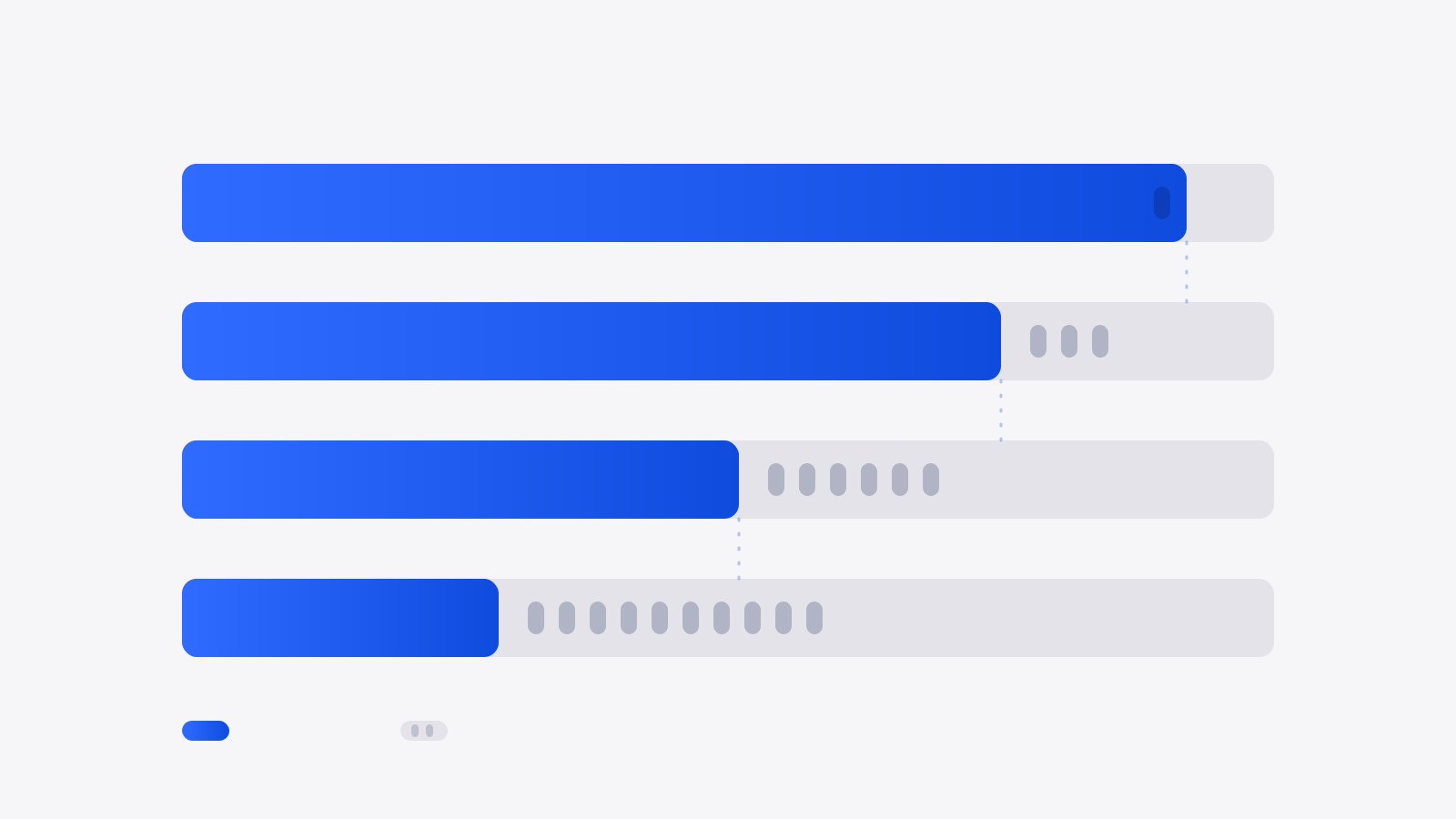
| Project type | Delivered by the tool | What's left to redo |
|---|---|---|
| Marketing page | Nearly everything | The copy and search optimization |
| Simple internal tool | The essentials | Edge cases and permissions |
| App with accounts and payments | About half | Security, error handling, billing |
| System tied to what exists | About a third | Integrations, migration, data cleanup |
These proportions come from our own mandates, not a benchmark. They vary by project, but the direction is constant: the more a system touches what already exists, the less a tool can do alone.
Side-by-side comparison
The six criteria that separate a prototype from something you can operate.
| Tool | No coding | Code export | Works on an existing project | Database included | Production-ready |
|---|---|---|---|---|---|
| Lovable | ✅ | ✅ | ❌ | ✅ | ⚠️ |
| Bolt.new | ✅ | ✅ | ❌ | ⚠️ | ⚠️ |
| Base44 | ✅ | ❌ | ❌ | ✅ | ⚠️ |
| Bubble | ✅ | ❌ | ❌ | ✅ | ✅ |
| Claude Code | ❌ | ✅ | ✅ | ❌ | ✅ |
| Cursor | ❌ | ✅ | ✅ | ❌ | ✅ |
| Replit | ⚠️ | ✅ | ⚠️ | ✅ | ⚠️ |
| ChatGPT | ⚠️ | ⚠️ | ❌ | ❌ | ❌ |
| v0 (Vercel) | ⚠️ | ✅ | ❌ | ❌ | ❌ |
| Google AI Studio | ✅ | ✅ | ❌ | ⚠️ | ⚠️ |
| Codex (OpenAI) | ❌ | ✅ | ✅ | ❌ | ✅ |
✅ yes · ⚠️ partially or with conditions · ❌ no. “Works on an existing project” is the decisive column: it's what separates a demo tool from a working tool. The v0, Google AI Studio and Codex rows are our assessment based on their documentation and public comparisons: confirm before deciding.
Which one should you pick?
Five concrete situations, and what we answer when asked.
You want to validate an idea before investing
Lovable or Bolt.new. In an evening you'll have something clickable to show five potential customers. It's the best money spent in this field: finding out nobody wants it costs a few dollars instead of a few months.
You want to replace an internal spreadsheet
Base44 or Bubble. These are simple, low-risk cases with few users and data you already control. Even imperfect, the result beats the seven-tab Excel version.
You already program
Claude Code if you live in the terminal, Cursor if you prefer an editor. Both work on your repository and respect what exists, which no app generator genuinely does.
The project touches your existing systems
None of these tools, alone. As soon as you have to connect to accounting software, migrate real data or comply with Law 25, the hard part isn't writing the code, it's knowing which code to write. That's where a prototype turns into debt.
You have neither the time nor the appetite to learn
Don't pick a tool, pick a person. That isn't a sales line: the leading cause of failure we see isn't the wrong tool, it's the project abandoned at 70% because whoever carried it also had a company to run.
And if you'd rather not code at all
These eight tools share one assumption: that someone on your side has the time and appetite to learn. If that isn't the case, the question isn't which tool to choose, but whether to choose one at all.
We use these tools ourselves every day, and that's precisely what lets us deliver a custom website for $1,500 in 7 days and a first web application for $5,000 in 14 days. The difference is that the result is reviewed, tested and maintained by people who do this for a living, and the code belongs to you.
We use these tools, you get the result
A professional website for $1,500 in 7 days, a first web application for $5,000 in 14 days. Reviewed, tested, deployed, and the code is yours from day one.
When should you move from vibe coding to an agency?
Vibe coding is excellent for a first version. It hits a ceiling when you need to:
- ✓take payments;
- ✓protect a database that holds personal information (Law 25);
- ✓manage reliable accounts and authentication;
- ✓plug in a real server and your existing systems.
Many people arrive at this stage with an impressive prototype that stops working as soon as these elements are added. It's a very good starting point: the prototype shows the vision, and an agency can take it over instead of starting from scratch. To choose one, see our top 10 custom software development companies in Montreal.
Go further
Frequently asked questions
What people ask us most about these tools.
What exactly is vibe coding?
It's describing what you want in plain language and letting artificial intelligence write the code. The term covers two very different realities: tools that build a complete application for you, and tools that write code inside a project you already own. Confusing the two explains most of the disappointment.
Can you really launch a business without knowing how to code?
To validate an idea and find your first customers, yes, and it's become the most sensible way to start. To operate the product as it grows, sooner or later you'll need someone who can read code, in-house or outside. The question isn't whether, it's when.
Is AI-generated code any good?
It works, which isn't the same thing. The problems we find most often when taking over are security, error handling and performance once data accumulates. None of those three is visible during a demo, and all three cost money later.
Which is cheapest?
ChatGPT's free tier, but it builds nothing for you. Among those that actually build, all have a free tier generous enough to form an opinion. Be wary of comparing subscriptions: what costs money in this category is consumption as the project grows, not the entry plan.
Should an AI-generated application be reviewed?
If it touches personal data, payments or your operations, yes. We do these reviews regularly and the findings are consistent: the product does what's expected of it, and it's almost always missing input validation, access logging and a backup strategy.
What's the best vibe coding tool in October 2026?
There's no single winner. Lovable, Bolt, Base44 and Replit suit starting without coding, v0 suits the interface, Cursor, Claude Code and Codex suit writing in a real project. The right choice depends on what you want to take away at the end: the code or just the app.
What should I do when my AI-generated app hits a ceiling?
It's common as soon as you need payments, a secure database, reliable authentication or a real server. An agency can take over your prototype rather than redo everything. Ask what it keeps and what it rewrites.