Yes, you can build your own CRM without knowing how to code: with vibe coding (describing what you want in plain language and letting an AI like Claude write the code), you can build a complete web CRM (companies, contacts, deals, activities), put it online at your own address and install it on your phone: it is a progressive web app (PWA), so it is also easily accessible from a mobile phone, like a real app, with no App Store. According to the internal guide we use at Oriana Solutions, a working first version takes 2 to 4 evenings and $0 to start, thanks to the free plans of GitHub, Vercel and Supabase.
This article follows that 60-step guide: the tools, the 11 phases in order, the five tables, the prompts to give Claude, the security rules, troubleshooting and, above all, the cases where you are better off hiring a developer. Nothing is magic: vibe coding replaces typing the code, not rigor.
Quick answer
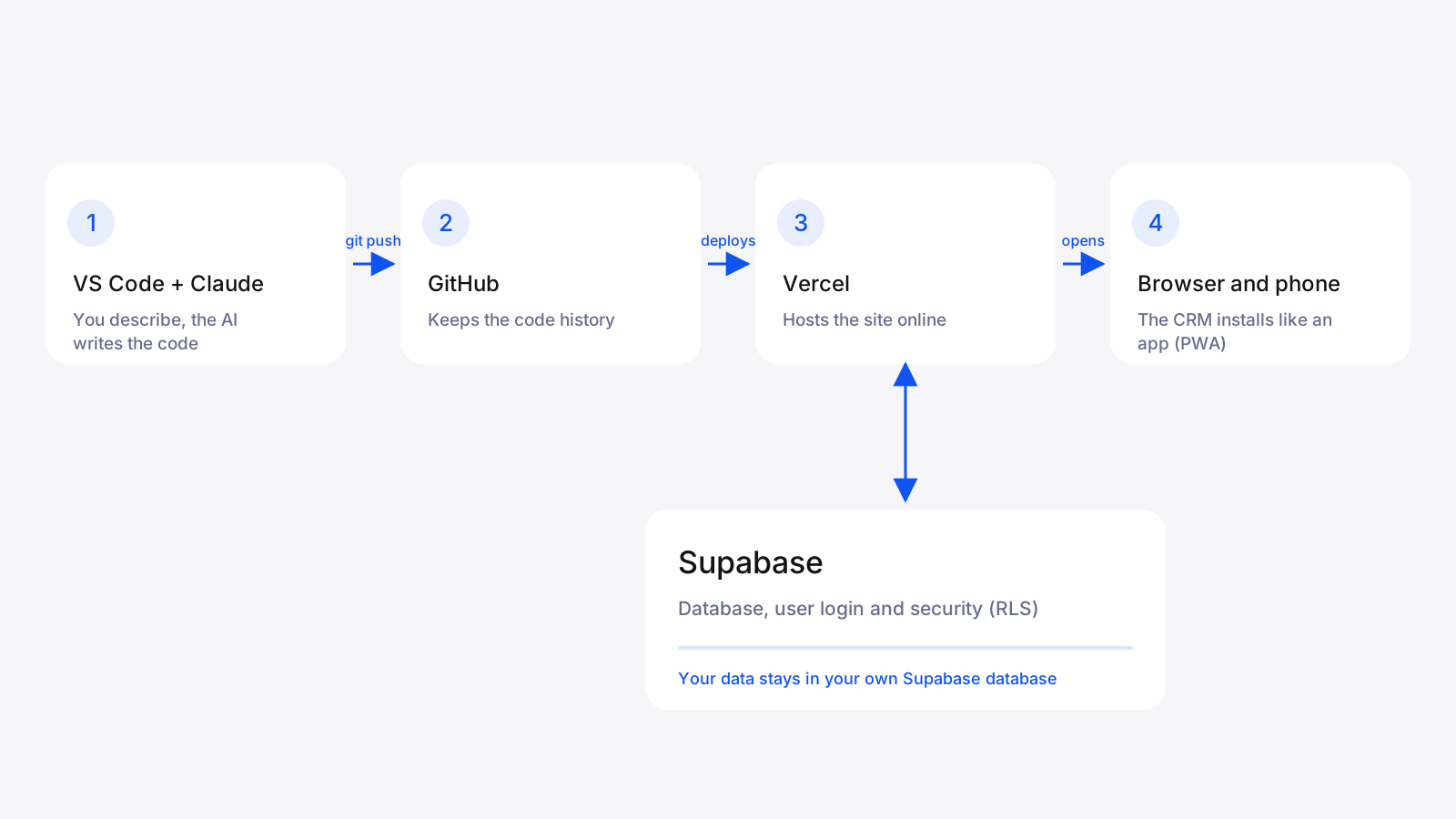
To build a custom CRM with vibe coding: 1) open GitHub, Vercel, Supabase and Claude accounts; 2) create a Next.js project; 3) set up the five tables (companies, contacts, deals, activities, profiles) in Supabase; 4) ask Claude for the pages and features one by one; 5) protect access (login, middleware and RLS rules); 6) publish on Vercel, connect your domain and install the CRM on your mobile phone: it is a progressive web app (PWA), accessible anywhere with no App Store. Plan on 2 to 4 evenings for a first version.
Summary: the answers in 30 seconds
The answers to the most common questions about custom CRMs and vibe coding, before the details:
- ✓Can you build a CRM without knowing how to code? Yes, for a first internal version: vibe coding replaces typing the code, not rigor.
- ✓How long does it take? 2 to 4 evenings for a working first version, according to Oriana Solutions' internal guide.
- ✓How much does it cost? $0 to start, thanks to the free plans of GitHub, Vercel and Supabase. Then plan for a paid Claude account (recommended), a domain name and, later, Supabase's paid plan.
- ✓What tools do you need? Visual Studio Code, Next.js, Supabase, GitHub, Vercel and Claude.
- ✓Which tables do you need? Five: companies, contacts, deals, activities and profiles.
- ✓Is it accessible on a mobile phone? Yes: it is a progressive web app (PWA), which installs on iPhone and Android with no App Store.
- ✓Is it secure? It can be, with mandatory login, middleware, Supabase's RLS rules, protected secret keys and backups.
- ✓Custom, or Zoho, Odoo, Salesforce, Pipedrive, HubSpot? A subscription suits a standard process; custom pays off when your processes are specific, the team grows or you want to plug in AI. For 5 salespeople, a custom MVP CRM pays for itself in under a year against HubSpot Professional or Salesforce Pro Suite.
- ✓When should you hire a developer? When the data is sensitive, integrations are needed, permissions are fine-grained, there are many users or nobody can maintain the tool.
What is vibe coding and why use it for a CRM?
Vibe coding means describing in natural language what you want to build and letting an AI generate the code, which you test, fix and improve by talking to it. The term became popular in 2025.
A CRM (Customer Relationship Management) is an ideal candidate, for three reasons. Its structure is simple and predictable: companies, contacts, deals (sales in progress) and activity notes. Its screens are classic: lists, forms, a dashboard and a pipeline. And its needs are specific to each business, which often makes off-the-shelf tools too heavy or poorly fitted.
For an overview of vibe coding tools and their limits, see our comparison Best vibe coding and no-code tools in 2026.
Can you really build a custom CRM without knowing how to code?
Yes, for a first internal version, as long as you follow the steps in order and check each result before moving on. The guide starts from a computer, an internet connection and an email address: no programming experience is required. The golden rule is to do one step at a time, without skipping any, even when it looks obvious.
What you get at the end: a web CRM protected by login, with lists and records for companies, contacts and deals, a pipeline by stage, a dashboard, an activity log and an app installable on your phone. What you do not get by default: advanced integrations (email, billing, calendar), fine-grained role management and technical support. More on that below.
| Vibe-coded CRM (this guide) | Off-the-shelf CRM | CRM built by a firm | |
|---|---|---|---|
| Starting cost | $0 to start (free plans) | Subscription, often per user | Development budget |
| Time to a first version | 2 to 4 evenings | Configuring the tool | Depends on project scope |
| Fit with how you sell | Total: you decide every field | Limited to the tool's options | Total, designed with you |
| Ownership of code and data | You own everything | With the vendor | You own the code |
| Mobile access | Progressive web app (PWA): installs on the phone, no App Store | Mobile app or browser, depending on the vendor | Depends on the project |
| Effort and responsibility | High: you maintain and secure it | Low | Handled by the team |
| Best for | Small team, precise need, tight budget | Standard need, fast-growing team | Complex needs, integrations, compliance |
Qualitative comparison. To choose between an off-the-shelf and a custom CRM, read [Salesforce or custom CRM](/blogue/salesforce-ou-crm-sur-mesure) and [Which CRM should a Quebec business choose](/blogue/quel-crm-choisir-entreprise-quebec).
What tools do you need to build a CRM with AI?
Six tools are enough, and all have a free plan or free version, except Claude, where a paid account is recommended if you want to use Claude Code directly in the editor, which avoids copy-pasting. Check each plan's current terms before you start, they change.
| Tool | Its role in the project | Cost to start |
|---|---|---|
| Claude | Writes most of the code from your requests | Paid account recommended for Claude Code |
| Visual Studio Code | The editor where you see and edit files | Free |
| Next.js, TypeScript and Tailwind | The site framework, code safety and styling | Free |
| Supabase | The database, user login and security rules | Free plan enough for an internal CRM, according to the guide |
| GitHub | Keeps the code history and lets you go back | Free plan |
| Vercel | Hosts the site online and redeploys on every code push | Free plan |
| Node.js and Git | Run the site on your computer and save versions | Free |
The domain name (for example crm.yourcompany.ca) is paid separately to your registrar.
How do you build your CRM in 11 phases?
The guide splits the project into 11 phases and 60 steps. Each phase ends with a verifiable result, so you know whether you can move on to the next.
- ✓Phase 1: create the accounts and install the tools (steps 1 to 8).
- ✓Phase 2: create the Next.js project in TypeScript (steps 9 to 17).
- ✓Phase 3: save the code on GitHub (steps 18 to 23).
- ✓Phase 4: set up the Supabase database (steps 24 to 28).
- ✓Phase 5: connect the site to the database (steps 29 to 33).
- ✓Phase 6: handle user login (steps 34 to 38).
- ✓Phase 7: build the CRM features (steps 39 to 44).
- ✓Phase 8: go live on Vercel (steps 45 to 49).
- ✓Phase 9: connect your domain (steps 50 to 52).
- ✓Phase 10: turn the site into an installable app (steps 53 to 57).
- ✓Phase 11: maintain the CRM (steps 58 to 60).
Phase 1: how do you create the accounts and install the tools?
First create a GitHub account, then a Vercel account and a Supabase account by choosing 'Continue with GitHub': it saves you one more password and already links the services. Also open a Claude account.
Then install Visual Studio Code, Node.js (take the LTS version, the recommended one, not 'Current') and Git. Open the VS Code terminal (Terminal menu, then New Terminal) and type 'node -v', 'npm -v' and 'git --version': three version numbers should appear. If a command answers 'command not found', close and reopen VS Code, or reinstall the tool.
Phase 2: how do you create the Next.js project?
Create a working folder called Projects in your documents, avoiding the desktop and especially folders synced by OneDrive or iCloud, which cause hard-to-understand bugs. Point the terminal at that folder, then run a single command that creates the whole site skeleton: 'npx create-next-app@latest crm-oriana --typescript --tailwind --eslint --app'. Answer Yes to the questions.
Enter the project folder with 'cd crm-oriana' (forgetting this is one of the most common mistakes), start the site with 'npm run dev' and open http://localhost:3000. 'Local' means on your computer only. To stop the server, press Ctrl+C (Ctrl even on Mac). Finally edit a first line in app/page.tsx to live the full work loop: edit, save, see the result.
Phase 3: how do you save your code on GitHub?
First make sure the .gitignore file contains the line '.env*.local'. Without it, your secret keys end up public on GitHub: it is the number one beginner mistake, and it is costly.
Then make a first commit (a snapshot of your code at a precise moment) with 'git add .', 'git commit -m 'first commit'' and 'git branch -M main'. On GitHub, create a Private repository named crm-oriana without ticking 'Add a README', then link your project with 'git remote add origin' followed by the repository address and 'git push -u origin main'. Then get into the habit of saving after each block of work: 'git add . && git commit -m 'added deals page' && git push'.
Phase 4: how do you set up the Supabase database?
In Supabase, click New project, name it crm-oriana and pick the closest region (East US or Canada Central). Generate a database password and keep it in your password manager: it is never shown again.
Then open the SQL Editor, paste the SQL block that creates the five tables and enables security, and click Run. Check in the Table Editor that you see entreprises, contacts, affaires, activites and profils, then add a test company and a test deal by hand. Finally copy, in Project Settings then API, the Project URL and the anon public key. The service_role key gives full access to the database: it must never end up in code visible to the browser.
The full SQL for the five tables, with RLS security, is below: copy it all into the SQL Editor, then click Run.
-- Entreprises
create table entreprises (
  id uuid primary key default gen_random_uuid(),
  nom text not null,
  secteur text,
  site_web text,
  cree_le timestamptz default now()
);

-- Contacts
create table contacts (
  id uuid primary key default gen_random_uuid(),
  entreprise_id uuid references entreprises(id) on delete set null,
  prenom text,
  nom text not null,
  courriel text,
  telephone text,
  poste text,
  cree_le timestamptz default now()
);

-- Affaires
create table affaires (
  id uuid primary key default gen_random_uuid(),
  titre text not null,
  entreprise_id uuid references entreprises(id) on delete set null,
  contact_id uuid references contacts(id) on delete set null,
  valeur numeric(12,2) default 0,
  etape text default 'Nouveau',
  probabilite int default 0,
  date_cloture_prevue date,
  cree_le timestamptz default now()
);

-- Activités
create table activites (
  id uuid primary key default gen_random_uuid(),
  affaire_id uuid references affaires(id) on delete cascade,
  contact_id uuid references contacts(id) on delete set null,
  type text,
  note text,
  date_activite timestamptz default now()
);

-- Profils des utilisateurs
create table profils (
  id uuid primary key references auth.users(id) on delete cascade,
  nom text,
  role text default 'membre'
);

-- Sécurité : personne ne lit la base sans être connecté
alter table entreprises enable row level security;
alter table contacts enable row level security;
alter table affaires enable row level security;
alter table activites enable row level security;
alter table profils enable row level security;

create policy "acces membres" on entreprises for all to authenticated using (true) with check (true);
create policy "acces membres" on contacts for all to authenticated using (true) with check (true);
create policy "acces membres" on affaires for all to authenticated using (true) with check (true);
create policy "acces membres" on activites for all to authenticated using (true) with check (true);
create policy "profil personnel" on profils for all to authenticated using (auth.uid() = id) with check (auth.uid() = id);
Phase 5: how do you connect the site to the database?
Stop the server, install the libraries with 'npm install @supabase/supabase-js @supabase/ssr', then create at the root a file named exactly .env.local (with the dot) that holds your URL and anon key. Next.js only reads this file at startup: after any change, stop and restart the server, or you will hunt for the problem for an hour.
Then ask Claude for the lib/supabase.ts file, the bridge between your site and the database, and then the app/affaires/page.tsx page. In Next.js, a folder inside app automatically becomes an address: the affaires folder gives /affaires. When the test deal shows up, it is the first real moment of satisfaction in the project.
Example contents of the .env.local file (no spaces around the equals sign, no quotes, one variable per line). Variables that start with NEXT_PUBLIC are visible in the browser: that is normal for these two, since security is ensured by the RLS rules in Supabase.
NEXT_PUBLIC_SUPABASE_URL=https://abcdefgh.supabase.co
NEXT_PUBLIC_SUPABASE_ANON_KEY=eyJhbGciOiJIUzI1NiIsInR5cCI6...
Phase 6: how do you handle user login?
In Supabase, check that the Email provider is active under Authentication, then create your administrator user (Authentication, Users, Add user). The guide suggests turning off 'Confirm email' during development so you do not have to confirm every test account.
Then ask Claude for the login page app/login/page.tsx, specifying that you use the App Router and @supabase/ssr, otherwise you may get code for an older structure. Add the middleware.ts file, which checks on every visit whether the person is logged in and sends them to /login otherwise: without it, anyone with the address sees your customer data. The test is simple: in a private window, /affaires must redirect to /login.
Phase 7: how do you build the CRM features?
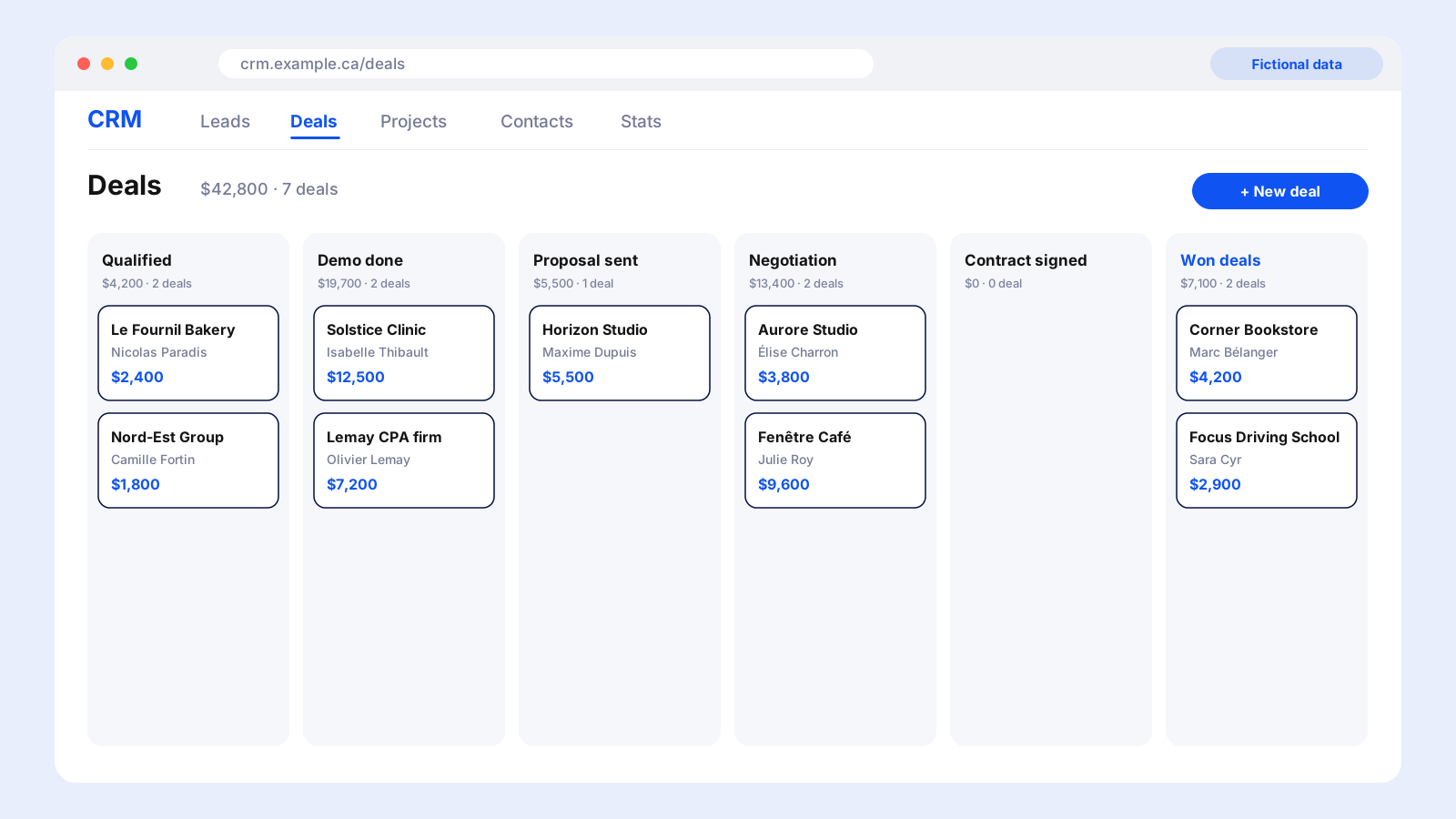
Build in this order, testing each feature before the next: the contact list, a creation form (start with deals, the heart of a CRM), editing and deleting, the pipeline stages, the dashboard and the activity log.
The pipeline uses five stages: New, Contacted, Proposal, Won, Lost. Show them as kanban-style columns, or with a simple filter to start: the filter is faster to build and often enough. The dashboard shows the number of open deals, the total pipeline value and the deals won this month. The activity log, on a deal's record, lets you note a call, an email or a meeting: this is precisely what sets a CRM apart from a simple spreadsheet.
Phase 8: how do you put your CRM online on Vercel?
On Vercel, click Add New then Project, import the crm-oriana repository and, before clicking Deploy, add in Environment Variables the same variables as in .env.local. Your .env.local file is not on GitHub, so Vercel cannot see it: forgetting this is the number one cause of failed deployments.
After one to three minutes, a .vercel.app address works. Remember the difference: localhost:3000 runs on your computer, only while 'npm run dev' is active, and is for testing; the Vercel address runs on the internet 24 hours a day, and it is what your team sees. Both use the same Supabase database. Finally, every 'git push' to the main branch redeploys the site automatically.
Phase 9: how do you connect your own domain (crm.yourcompany.ca)?
In Vercel, open Settings then Domains and add your subdomain, for example crm.yourcompany.ca: Vercel shows the DNS record to create. At your registrar, in the DNS section, create a CNAME record with the name 'crm' and the value Vercel gives you (cname.vercel-dns.com). Depending on the registrar, the name field expects 'crm' alone or the full domain.
Propagation takes a few minutes to a few hours. Vercel moves the domain from Invalid Configuration to Valid by itself and installs the HTTPS certificate without you doing anything: the site then opens with the security padlock.
Phase 10: how do you turn your CRM into an installable app (PWA)?
A Progressive Web App (PWA) is a site that installs like an app: an icon on the phone or desktop, full-screen display, no address bar. There is no App Store, no approval and no separate version to maintain. That is what makes your CRM easily accessible from a mobile phone: your salespeople use it in meetings or on the road, like any app.
Create two square PNG images of your logo (192 and 512 pixels) in the public folder, then ask Claude for the app/manifest.ts file, which Next.js serves automatically. On iPhone, open the site in Safari, tap Share then 'Add to Home Screen'. On Android, Chrome offers Install app. Offline mode, optional, relies on a service worker (the Serwist library): only add it once everything else is stable, because caching complicates debugging.
Phase 11: how do you maintain your CRM?
Three habits are enough. Take backups: in Supabase (Database, then Backups), download a manual export every month on the free plan and keep it somewhere other than Supabase. Watch the free project: according to the guide, a free project pauses after a week without activity, and the Restore project button brings it back without losing data; move to the paid plan as soon as the CRM becomes essential to the business. Work in small improvements: one change at a time, test locally, commit, push. If a release breaks something, the Deployments tab in Vercel lets you go back to the previous version in one click with Rollback.
Which tables does a CRM need?
A basic CRM fits in five tables, created all at once in Supabase: companies, contacts, deals, activities and profiles. The relationships are simple: a company has several contacts and several deals, and a deal has several activities.
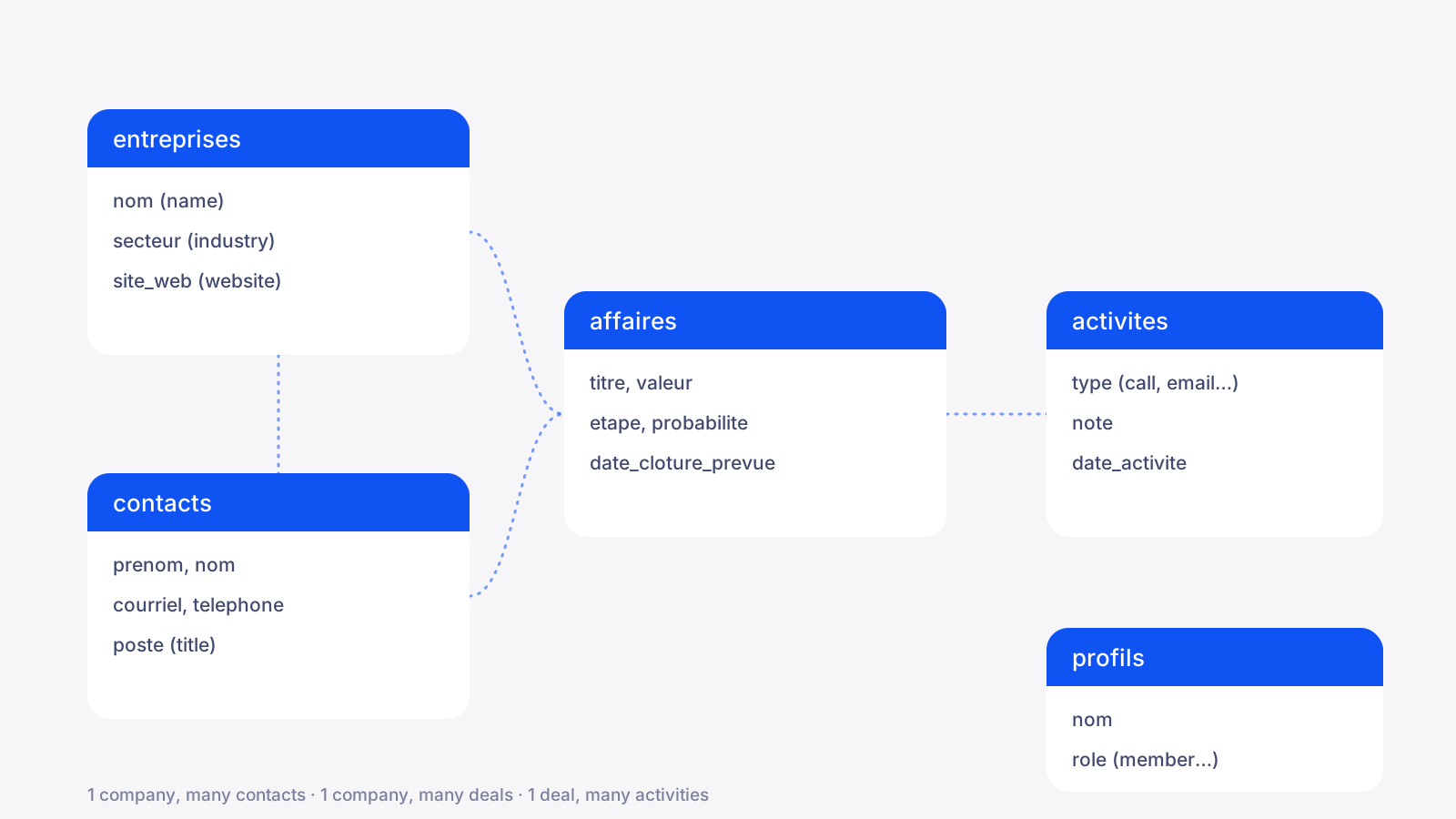
| Table | What it holds | Main columns |
|---|---|---|
| entreprises | The organizations you do business with | nom, secteur, site_web, cree_le |
| contacts | People, linked to a company | prenom, nom, courriel, telephone, poste |
| affaires | Sales in progress, linked to a company and a contact | titre, valeur, etape, probabilite, date_cloture_prevue |
| activites | The log: calls, emails, meetings | type, note, date_activite |
| profils | The CRM's users and their role | nom, role (member by default) |
The SQL also enables RLS security on all five tables. Ask Claude to generate the SQL code matching this schema. The column names above are French because the guide's SQL uses them.
What prompts should you give Claude to write the CRM code?
A good prompt states your technology, asks for one file at a time and says where to paste it. Four habits change everything: always say you use Next.js with App Router, TypeScript, Tailwind and Supabase; ask for one file at a time and the exact place to paste it; when it does not work, paste the full error message instead of summarizing it; and once comfortable, use Claude Code in VS Code, which edits the files directly.
| Step | What to ask Claude | What to check next |
|---|---|---|
| Supabase client | Write me the lib/supabase.ts file for a Next.js project with App Router and TypeScript, using @supabase/ssr. I want separate browser and server clients. Explain where to paste each block. | No red underline in VS Code |
| Deals page | Create app/affaires/page.tsx in Next.js App Router and TypeScript. The page reads the affaires table in Supabase and shows title, company, value and stage in a clean Tailwind table. Handle the empty-list case. | The /affaires page shows the test deal |
| Login page | Create app/login/page.tsx with email, password and a button, using Supabase's signInWithPassword. Show the error if login fails and redirect to /affaires if it succeeds. | A wrong combination shows a clear error |
| Page protection | Write the middleware.ts file that protects all pages except /login, with @supabase/ssr for Next.js App Router. Explain it line by line. | In a private window, /affaires redirects to /login |
| Creation form | Add a deal creation form: title, company chosen from a dropdown, value, stage and expected close date. Save to Supabase and refresh the list after adding. | The created deal also appears in Supabase |
| Dashboard | Create the CRM home page with three indicators: number of open deals, total pipeline value, deals won this month. Compute everything server-side. | The numbers match the real data |
| PWA manifest | Create app/manifest.ts to turn my Next.js site into an installable PWA. Name CRM Oriana, standalone mode, 192 and 512 icons already in public. | /manifest.webmanifest returns JSON |
| Troubleshooting | Paste the full terminal error message, then write: here is my error, explain in plain English what is wrong and how to fix it. | Apply one fix at a time, then retest |
Replace 'CRM Oriana' with the name of your CRM.
How do you secure a CRM built with AI?
A CRM holds customer data: security is not optional, even for an internal tool. Code written by an AI must be reviewed, tested and secured like any other. Here are the protections the guide requires, in the order they appear.
- ✓Ignore .env.local in Git: the .env*.local line in .gitignore keeps your keys from ending up public on GitHub.
- ✓Keep the service_role key secret: it gives full access to the database and must never end up in code visible to the browser.
- ✓Require login: the middleware.ts file sends anyone not logged in to /login.
- ✓Enable RLS rules (Row Level Security): the database itself refuses any request that does not come from a logged-in user. It is a second barrier, never to be disabled in production.
- ✓Protect the database password: store it in a password manager, because it is never shown again.
- ✓Back up every month: export the database outside Supabase.
If your keys end up on GitHub
If the .env*.local line was missing from .gitignore and you pushed your keys, regenerate them immediately in Supabase, fix .gitignore, then push the code again. Also keep Quebec's Law 25 in mind: a CRM holds personal information, which calls for clear privacy rules. Our Law 25 compliance scan lets you do a first pass.
What are the common errors and how do you fix them?
Most blockers in the project have a known cause and a quick fix. Here are the eight most frequent symptoms from the guide.
| Symptom | Likely cause | Fix |
|---|---|---|
| command not found: npm | Node.js is not installed, or the terminal was opened before installation | Close and reopen VS Code entirely; otherwise reinstall the Node.js LTS version |
| The site does not open on localhost:3000 | The server is not started, or the port is already taken | Check that npm run dev is running and look at the exact address shown (it may be port 3001) |
| EADDRINUSE error | An old server is still running in the background | Close other terminals, or use the port Next.js displays |
| No data shows up | RLS blocks the request because nobody is logged in | Log in via /login; check the policies in Supabase, Authentication, Policies |
| Invalid API key | Key badly copied, extra space, or server not restarted | Copy the key in full again, then Ctrl+C and npm run dev |
| Works locally but not on Vercel | The environment variables were not added in Vercel | Add them in Settings, Environment Variables, then Redeploy |
| Deployment fails (Build failed) | A TypeScript error that does not show in development mode | Run npm run build locally to see the same error, fix it, then push again |
| The domain stays Invalid Configuration | The CNAME has not propagated yet, or is misspelled | Wait a few hours; check whether your registrar expects 'crm' or the full domain |
How much time and money should you plan for?
Plan on 2 to 4 evenings for a working first version and $0 to start, since GitHub, Vercel and Supabase each offer a free plan the guide considers enough for an internal CRM. That is a starting point, not a total cost.
Some expenses come later: a paid Claude account if you want to use Claude Code in the editor, the domain name at your registrar, and the move to Supabase's paid plan as soon as the CRM becomes essential (a free project pauses after a week without activity). You also need to count your maintenance time, which appears on no invoice. To compare with professional development, see How much does custom software cost.
What can you add to your CRM with AI? Two examples at Oriana
A custom CRM becomes really interesting once you plug AI into it. At Oriana Solutions, we use our own CRM, built with this guide's method, and we added two tools to it.
An integration with Claude's API that reads and creates our service offers. Writing a service offer used to take us about 1 hour. It now takes about 5 minutes.
An AI agent that gives us our 3 priorities of the day. Instead of hunting for what to handle first, we open the dashboard and the agent tells us the three actions for the day.
These two examples are only possible because we own the CRM: we decide its data and its features, without waiting for a vendor to offer them and without paying for a higher plan.
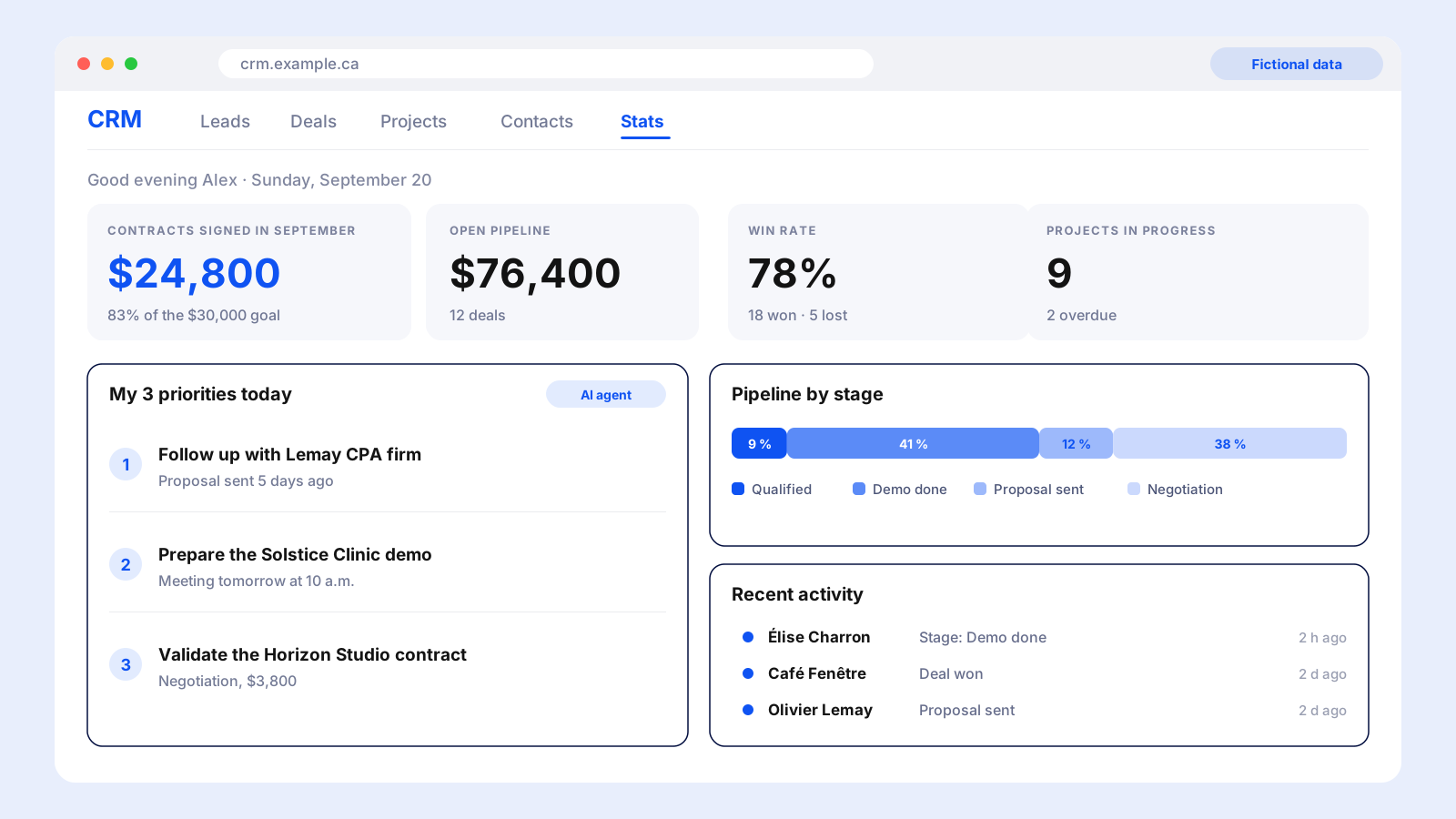
Mockups with fictional data
The screens in this article are recreated from our CRM with fictional data (invented names, companies and amounts), to protect our clients.
Custom, Zoho, Odoo, Salesforce, Pipedrive or HubSpot: which should you choose?
Custom is the only model where you own the code and the data, with no per-user license. Zoho, Odoo, Salesforce, Pipedrive and HubSpot are per-user subscriptions: they start fast and offer many ready-made integrations. The right choice depends on team size, how specific your processes are and how much maintenance you are willing to take on.
| Custom (Oriana) | Zoho CRM | Odoo | Salesforce | Pipedrive | HubSpot | |
|---|---|---|---|---|---|---|
| Pricing model | One-time investment, then hosting | Per-user subscription | Per-user subscription (all apps included) | Per-user subscription | Per-user subscription | Per-seat subscription |
| Entry plan (per user per month, billed annually) | MVP from CA$5,000, one time | US$14 (Standard)* | CA$44.20 (Standard) | US$25 (Starter Suite) | CA$19 (Lite) | US$7 annual, US$20 monthly (Starter) |
| Typical mid-tier plan | Modules added as you need them | US$23 (Professional)* | CA$44.20 (same Standard plan) | US$100 (Pro Suite) | CA$49 (Growth) | US$90 (Professional), plus US$1,500 onboarding |
| Advanced plan | Full CRM: CA$10,000 to CA$40,000, one time | US$40 (Enterprise)* | CA$68.50 (Custom) | US$195 (Core) | CA$79 (Premium) | US$150 (Enterprise), plus US$3,500 onboarding |
| When the team grows | No per-user license | The bill grows with every user | The bill grows with every user | The bill grows with every user | The bill grows with every user | The bill grows with every seat |
| Customization | Total: fields, screens, rules and automations your way | High, depending on the plan | High, through modules | Very high, often with an administrator | Medium | Medium to high, depending on the plan |
| Ownership of code and data | You own everything, hosted where you decide (for example in Canada) | With the vendor | With the vendor, or self-hosted with the Community edition | With the vendor | With the vendor | With the vendor |
| AI integration | Direct: Claude or your own agents (service offers, daily priorities) | Vendor AI features, depending on the plan | Vendor AI features, depending on the plan | Vendor AI features (Agentforce 1 Sales listed at $550) | Vendor AI features, depending on the plan | Vendor AI features, depending on the plan |
| Time to get started | MVP in 14 days, full CRM in 4 to 12 weeks | A few days of setup | A few days to a few weeks | Often several weeks | A few hours to a few days | A few days, more with Professional onboarding |
| Mobile access | PWA installable on iPhone and Android, no App Store | Vendor's mobile app | Vendor's mobile app | Vendor's mobile app | Vendor's mobile app | Vendor's mobile app |
| Ready-made integrations | Built as you need them | Many | Many modules and connectors | Very wide ecosystem | Wide catalog | Wide catalog |
| Maintenance | Yours, or handled by Oriana | Handled by the vendor | Handled by the vendor (online) | Handled by the vendor | Handled by the vendor | Handled by the vendor |
| Main limit | Needs initial development and follow-up | Per-user cost | Per-user cost, module complexity | High cost on advanced plans | Advanced features depend on the plan | High cost of the Professional plan |
| Best for | Specific sales process, growing team, sensitive data | Small teams on a tight budget | Businesses that want a CRM and an ERP together | Large teams with a dedicated administrator | Sales teams centered on the pipeline | Teams that combine marketing and sales |
Public prices collected in September 2026 from Salesforce, HubSpot, Odoo and Pipedrive's official pages, in the currency displayed (US$ or CA$). *Zoho: prices consistent across several third-party comparisons (billed annually); the official page shows prices based on the visitor's location. Prices change often and exclude taxes and options. The qualitative ratings (customization, time to get started, ecosystem) are Oriana Solutions' own.
How much can a team of 5 salespeople save with a custom CRM?
It depends on the plan you compare with. For a team of 5 salespeople, a subscription costs US$1,380 to US$11,700 per year depending on the tool and plan, while a custom MVP CRM costs CA$5,000 once, plus hosting estimated at $30 a month, with no per-user license.
The calculation below uses public prices from September 2026, in the currency each vendor displays (US$ or CA$), and custom in Canadian dollars. Since the US dollar is usually worth more than the Canadian dollar, comparing the numbers as they are is cautious for US-dollar subscriptions. To adapt it to your team, multiply the number of salespeople by the per-user price, then by 12: that is your annual cost, to compare with a custom build's initial investment and hosting.
| Option for 5 salespeople | Cost per year | Total over 3 years | Total over 5 years |
|---|---|---|---|
| Zoho CRM Professional (US$23 per user, billed annually) | US$1,380 | US$4,140 | US$6,900 |
| Odoo Standard (CA$44.20 per user) | CA$2,652 | CA$7,956 | CA$13,260 |
| Pipedrive Growth (CA$49 per user) | CA$2,940 | CA$8,820 | CA$14,700 |
| HubSpot Sales Hub Professional (US$90 per seat, plus US$1,500 onboarding) | US$5,400 | US$17,700 | US$28,500 |
| Salesforce Pro Suite (US$100 per user) | US$6,000 | US$18,000 | US$30,000 |
| Salesforce Core (US$195 per user) | US$11,700 | US$35,100 | US$58,500 |
| Custom MVP CRM (CA$5,000 once, plus CA$30 a month hosting) | CA$360 after the first year | CA$6,080 | CA$6,800 |
Assumptions: 5 users, annual billing, no added users or modules, taxes, exchange rate and options excluded. Hosting is estimated at $30 a month (Oriana's offer says a few dozen dollars). Enhancements to the custom CRM are extra.
How to read these numbers
Against HubSpot Professional or Salesforce (Pro Suite or Core), a custom MVP CRM pays for itself in under a year, and the gap reaches about $11,600 to $29,000 over 3 years. Against Odoo Standard or Pipedrive Growth, it becomes cheaper after 3 years (a gap of about $1,900 to $2,700). Against Zoho Professional (US$23 per user), the subscription stays cheaper: custom then wins less on price than on fit with your processes and on ownership. And every salesperson you add raises a subscription's bill, not a custom CRM's.
What are the advantages of a custom CRM that you own?
A custom CRM belongs to you, and it adapts to your business rather than the other way around. Here is what that changes in practice.
- ✓You own it: the code and the database are yours. No vendor can change its terms or raise its prices.
- ✓It adapts to your business: your fields, your sales stages, your rules and your reports, not those of a generic tool.
- ✓No per-user license: hiring a salesperson does not raise the software bill.
- ✓It opens anywhere, including on a mobile phone: it is a progressive web app (PWA), which your salespeople install on their phone like an app, without going through an App Store.
- ✓Your data stays where you decide, for example in Canada, which helps with Law 25 compliance.
- ✓AI plugs straight in: service offers generated in minutes, daily priorities, and whatever you dream up next.
- ✓It evolves in small steps, at the pace of your needs, without switching software.
How can Oriana Solutions help with your CRM?
You can follow this guide yourself, or hand us all or part of the project. We adapt the CRM to your business and your needs, whether you start from scratch or from a prototype.
- ✓An MVP in 14 days at a fixed price, from $5,000: your pipeline, your client records and your process, ready to use.
- ✓A full CRM, generally $10,000 to $40,000 depending on scope: automations, integrations and dashboards.
- ✓Taking over your prototype built with vibe coding, to secure it and make it reliable.
- ✓AI integration: service-offer generation, a daily-priorities agent and other automations.
- ✓Hosting in Canada and attention to Law 25.
When is vibe coding enough for your CRM?
Vibe coding is enough when the need is precise, the team small and the data not very sensitive, and you accept maintaining the tool yourself.
- ✓A small team tracking its sales and contacts.
- ✓A well-defined need: companies, contacts, deals, notes.
- ✓A tight budget or a need to validate an idea before investing.
- ✓Someone with the time to learn, test and maintain.
- ✓A prototype that professionals can take over later.
When should you hire a developer instead?
Hire a developer as soon as the CRM becomes critical to the business or more complex than its five tables. Vibe coding produces quickly, but it replaces neither architecture, nor testing, nor responsibility for security.
- ✕Sensitive or regulated data (health, finance, personal information in volume), where a mistake is costly.
- ✕Integrations with billing, email, calendar or other software.
- ✕Fine-grained roles and permissions: who sees what, by team or by client.
- ✕Many users or a need for reliability and round-the-clock support.
- ✕Nobody to maintain the tool when it breaks or when needs change.
The right reflex
Use vibe coding to prototype and validate how you sell, then have professionals take the project over when it becomes essential. To choose the right person, read How to choose a custom software developer.
Action plan: your CRM in four evenings
This split is a suggestion from Oriana Solutions to fit the guide's 2 to 4 evening range. Adapt it to your pace.
- ✓Evening 1: the foundations. Phases 1 to 3: accounts, tools, Next.js project, first commit on GitHub.
- ✓Evening 2: the data. Phases 4 to 6: Supabase, five tables, user login, middleware and RLS.
- ✓Evening 3: the features. Phases 7 and 8: contacts, deals, pipeline, dashboard, log, going live on Vercel.
- ✓Evening 4: the finishing touches. Phases 9 to 11: domain, installable app, backups and work method.
Frequently asked questions about custom CRMs and vibe coding
What is vibe coding?
Vibe coding means describing in natural language what you want to build and letting an AI, like Claude, write the code. You then test the result, fix it and improve it by talking to the AI.
Can you build a CRM without knowing how to code?
Yes, for a first internal version. The guide starts from a computer, an internet connection and an email address, with no programming experience, as long as you follow the 60 steps in order and check each result.
How long does it take to build your CRM with AI?
According to the guide, a working first version takes 2 to 4 evenings if you follow the steps in order.
How much does building a CRM with vibe coding cost?
The starting point is $0, because GitHub, Vercel and Supabase each have a free plan enough for an internal CRM. Then plan for a paid Claude account (recommended), a domain name and, later, Supabase's paid plan.
What tools do you need to build a custom CRM?
Visual Studio Code to write, Next.js for the site, Supabase for the data, GitHub for the history, Vercel for hosting and Claude to write the code, with Node.js and Git installed on your computer.
Which tables does a CRM need?
Five tables are enough for a basic CRM: companies, contacts, deals, activities and profiles. A company has several contacts and several deals, and a deal has several activities.
Is a CRM built with AI secure?
It can be if you apply the guide's protections: ignore .env.local in Git, keep the service_role key secret, require login with middleware, enable RLS rules in Supabase and back up regularly. AI-generated code must always be reviewed and tested.
What is a progressive web app (PWA) and why is it useful for a CRM?
A progressive web app (PWA) is a site that installs like an app: an icon on the phone or desktop, full-screen display, no address bar. For a CRM, it means your team can easily use it from a mobile phone, in meetings or on the road, with no App Store, no approval and no separate version to maintain.
Can you install your CRM on a phone?
Yes, by turning it into a Progressive Web App (PWA). On iPhone, open the site in Safari and choose Share then 'Add to Home Screen'; on Android, Chrome offers Install app. No App Store is needed.
What happens if my free Supabase project pauses?
According to the guide, a free project pauses after a week without activity. Just click Restore project in the dashboard: the data is kept. Move to the paid plan as soon as the CRM becomes essential.
When is it better to hand your CRM to a developer?
When the data is sensitive, integrations are needed, permissions are fine-grained, the number of users is high or nobody can maintain the tool. Vibe coding works well for prototyping, then professionals can take the project over.
How much can a team of 5 salespeople save with a custom CRM?
Against HubSpot Sales Hub Professional or Salesforce Pro Suite, the gap reaches about $11,600 to $12,000 over 3 years for 5 salespeople, and a $5,000 custom MVP CRM pays for itself in under a year. Against Odoo Standard or Pipedrive Growth, custom becomes cheaper after 3 years; against Zoho Professional (US$23 per user), the subscription stays cheaper, and custom then wins on fit and ownership. Subscription prices change: check the official sites.
Custom CRM or Zoho, Odoo, Salesforce, Pipedrive, HubSpot: which should you choose?
Choose a subscription for a standard sales process, a fast start and ready-made integrations. Choose custom when your processes are specific, when the team is growing (no per-user license), when your data is sensitive or when you want to plug in AI directly.

Would you rather have us build your CRM for you?
You have the prototype or only the idea: our team designs a custom CRM, secure and fitted to how you sell, without you having to maintain it.
- ✓A CRM tailored to your sales process
- ✓Security, backups and compliance handled for you
- ✓Your existing prototype can be taken over
Sources and references
- 1.Salesforce official pricing (Canada) — Starter Suite US$25, Pro Suite US$100, Core US$195 per user per month (billed annually).
- 2.HubSpot Sales Hub official pricing — Starter US$7 (annual), Professional US$90 (annual) plus US$1,500 onboarding, Enterprise US$150 plus US$3,500 onboarding.
- 3.Odoo official pricing (Canada) — Standard CA$44.20 and Custom CA$68.50 per user per month, all apps included (billed annually).
- 4.Pipedrive official pricing (Canada) — Lite CA$19, Growth CA$49, Premium CA$79, Ultimate CA$109 per user per month (billed annually).
- 5.Zoho CRM pricing — US-dollar prices, billed annually, consistent across several third-party comparisons (Standard $14, Professional $23, Enterprise $40). The official page shows prices based on the visitor's location.
- 6.Oriana Solutions custom CRM offer — MVP in 14 days from $5,000, full CRM $10,000 to $40,000, hosting of a few dozen dollars a month.
- 7.Oriana Solutions internal guide — Building a CRM from A to Z: 60 steps, SQL annexes, variables, prompts and troubleshooting.
- 8.Next.js documentation — App Router, middleware.ts and manifest.ts.
- 9.Supabase documentation — Postgres, authentication, row-level security (RLS) and backups.
- 10.Vercel documentation — Deployment, environment variables, domains and rollback.
- 11.GitHub documentation — Private repositories and code history.